Introduction
The Navigation section explains how to move around the EHR and access the features and information you need. It provides an overview of the main navigation menus, page controls, and other common elements used throughout the system.
Use this section to become familiar with the layout of the EHR, learn how to move between different areas of the site, and quickly locate commonly used features and tools.
info
Navigation menu options vary based on your permissions and account configurations.
Top Navigation Menu
Left Navigation Menu
| Menu | Description | |
|---|---|---|
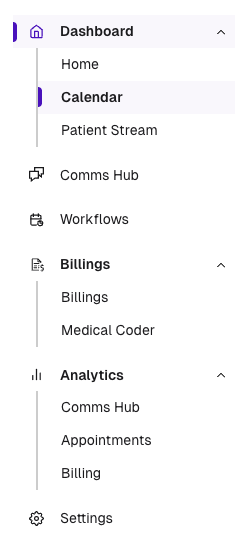 | Home | The Home Dashboard provides an at-a-glance view of the clinic’s daily activity, including appointments, cancellations, and no-shows, along with assigned tasks and action items for the logged-in user. |
| Calendar | Provides a centralized view of clinic schedules and appointments. It enables staff to view availability, schedule and manage appointments, and coordinate provider and clinic resources efficiently from a single calendar interface. | |
| Patient Stream | Provides a dynamic view of upcoming appointments and patient activity, enabling staff to efficiently move patients through each stage of the visit workflow and monitor their progress throughout the care journey. | |
| Comms Hub | A centralized workspace for managing clinic communications across SMS, fax, and voice channels. It brings patient and external communications together in one place, helping back-office staff efficiently manage conversations and requests without switching between multiple systems. | |
| Workflows | Provides visibility into the patient intake process, including the status of required pre-visit tasks and prerequisites, helping staff ensure patients are prepared and ready to be seen. | |
| Billings | Workspace for managing the clinic’s billing and revenue cycle workflows. It enables staff to manage claims, track payment status, review billing activity, and address outstanding items to help streamline reimbursement and maintain an efficient revenue cycle. | |
| Analytics | Provides insights into activity, performance, and trends across various EHR features and workflows. It enables staff to monitor key metrics, review operational and clinical data, and identify opportunities to improve efficiency, performance, and patient care. | |
| Settings | Provides a centralized location to manage system configurations, user permissions, roles, integrations, workflows, and feature preferences, allowing clinics to tailor the EHR to their operational needs. |